Page 1 of 1

Annoying bubble

PostPosted: Tue Nov 30, 2004 9:48 pm
by lilpinkflower
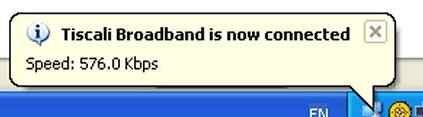
How do I get this annoying bubble not to appear ?
Image

I have to click it off whenever I connect...it drives me nuts :|

ta

lilpink x

PostPosted: Tue Nov 30, 2004 10:27 pm
by Limp
Right click on My Network Places. Select Properties, Right click on your connection, select properties, in the conection properties box under the general tab un check the "show icon in notification area when connected" box down at the bottom. Hope this helps :mrgreen:

PostPosted: Tue Nov 30, 2004 10:41 pm
by venney
i got my grandparents tescali broadband, they have maby the 112 or summint but when it connects says 2.2mbps lol no idea why it says it.

Venney
:)

PostPosted: Tue Nov 30, 2004 10:49 pm
by lilpinkflower
hhehe venney

limp.... i tried and it didnt work

Image

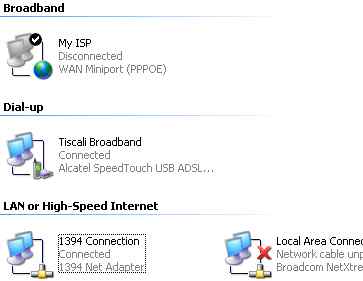
I tried unchecking the box in the top 'My ISP' and I looked in the bottom left one '1394 connection' because I doubted whether I knew which one my connection was !.. and that one said 'connected'... when I looked in that one the box was already unchecked... hey ho :|

Thanks for trying :)

lilpink x

PostPosted: Tue Nov 30, 2004 11:10 pm
by lilpinkflower
arrghh it was the middle one....because it said dial-up i didnt think it was that one... problem is solved ! but i have lost the icon as well from my systray.... i don't suppose that matters :)

Thanks !

lilpink x