Page 1 of 2

Keeping little fingers off !!

PostPosted: Thu Dec 09, 2004 9:54 pm
by lilpinkflower
What are the options for child-proofing a keyboard ?

I have a simple lock on it at the moment but my daughter has discovered all you need to do is hit the spacebar and everything is up and running again :|

ta

lilpink x

PostPosted: Thu Dec 09, 2004 10:01 pm
by venney
Lol bless thats well cute.
I did some backgrond research for you lilpink but i couldnt find anything. I searched for lockign keybored, childproofing key bored, disabling keybored.

Sorry cant find anything, i have 2 go now as well but when im next on il look more!

Venney
:)

PostPosted: Thu Dec 09, 2004 10:03 pm
by lilpinkflower
hehe your a sweetheart venney :)

Just so long as you typed the correct spelling of 'keyboard' into Google :D

You know I'm only kidding!

lilpink x

PostPosted: Thu Dec 09, 2004 10:34 pm
by Limp
Hey lilpink! I found this ยป

PostPosted: Thu Dec 09, 2004 10:55 pm
by lilpinkflower
Nothing's ever simple ...is it? :|

hehe

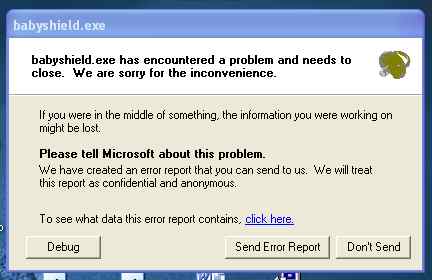
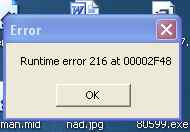
This program looks like just what I need.. but I can't get it to run !!

First I get this

Image

then I get this

Image

arrghhhh lol

lilpink x

*last PM I got was about whether I liked AVG la la la.... n I hope you know PCguy may remove this post because here is not the place to discuss PM's..... *slaps Limp's hand... and also Lilpink's for replying*... hehe that will ingratiate us to the boss no end :lol:

PostPosted: Thu Dec 09, 2004 11:00 pm
by Limp
Woops :shock: (EDIT:PM question removed from last post) :wink:
Hmm did you find any info out on that error?

PostPosted: Thu Dec 09, 2004 11:13 pm
by lilpinkflower
Nope... I'm in the middle of doing boring work... so all I did was uninstall/ reinstall..... then i uninstalled again...went back to the site... made sure i had downloaded the XP version... i had.... installed again... and errors again !

hehehe

*goes back to boring work*

hehehehe

lilpink x

It looks a good program as well :roll:

PostPosted: Thu Dec 09, 2004 11:19 pm
by Un4g1v3n
Heres an easy solution.

Move your mouse to the lower left section of the screen to the start menu.

From the start menu, select 'Shut Down'. When it asks you to restart, log off or shut down, click the 'Shut Down' icon. You will notice now that the computer has powered down, therefor making it completely baby-safe, until she/he learns that there is a power button...

:)

PostPosted: Fri Dec 10, 2004 12:21 am
by lilpinkflower
I checked this... with the hammering of the spacebar (LMAO) and it took me to standby...which is not so bad i suppose.... i will keep this in mind :)

If I had performed a true spacebar hammmering experiment i would have done it with a tin of vaseline lolz.... *sterilise me now!!!* :|

hehehehhehehehe

lilpink x

*edits* the spacebar sends you right back to funland when you hit it after standby.... just a thought :(

PostPosted: Fri Dec 10, 2004 5:27 am
by liljim
might work

PostPosted: Fri Dec 10, 2004 5:36 am
by Un4g1v3n
You dont like my suggestion?

PostPosted: Fri Dec 10, 2004 8:06 am
by lilpinkflower

PostPosted: Fri Dec 10, 2004 9:50 am
by Un4g1v3n

PostPosted: Fri Dec 10, 2004 1:22 pm
by teststrips

PostPosted: Fri Dec 10, 2004 1:25 pm
by lilpinkflower