If they were in "Run-" that means you had them disabled in MSCONFIG.
brad
It is currently Tue Oct 20, 2026 3:39 pm
PCTech Forums
A friendly computer support place
help!
47 posts
• Page 3 of 4 • 1, 2, 3, 4
 by lilpinkflower » Sat Aug 21, 2004 9:18 pm
Oooooooooooo fresh hope !!!!
Mrs PC ..... that's eitha a compliment or u r bein a cheeky sod as usual lol
 .........n i think i know which one it is hehe
i'm goin to try ur idea
lilpink x
Mrs PC ..... that's eitha a compliment or u r bein a cheeky sod as usual lol
.........n i think i know which one it is hehe
i'm goin to try ur idea
lilpink x
System specs:
Clovebud No.7, Max Factor Hypersmooth, L'Oreal Lash Architect, The Body Shop Poudre Libre, 17 Nude blusher and hair by Uppercutz.

Clovebud No.7, Max Factor Hypersmooth, L'Oreal Lash Architect, The Body Shop Poudre Libre, 17 Nude blusher and hair by Uppercutz.
-

lilpinkflower 
- Moderator
- Posts: 1603
- Joined: Wed Apr 07, 2004 1:00 am
- Location: manchester, U.K
Thanks given:0
Thanks received:0
by lilpinkflower » Sat Aug 21, 2004 9:44 pm
It's not there 

hehe
lilpink x
hehe
lilpink x
System specs:
Clovebud No.7, Max Factor Hypersmooth, L'Oreal Lash Architect, The Body Shop Poudre Libre, 17 Nude blusher and hair by Uppercutz.
Clovebud No.7, Max Factor Hypersmooth, L'Oreal Lash Architect, The Body Shop Poudre Libre, 17 Nude blusher and hair by Uppercutz.
-
lilpinkflower - Moderator
- Posts: 1603
- Joined: Wed Apr 07, 2004 1:00 am
- Location: manchester, U.K
Thanks given:0
Thanks received:0
by Cactus » Sun Aug 22, 2004 8:48 am
Hey...I think brad and I found it...in that first SCREENSHOT you sent me.
At the bottom of pic,2nd entry from bottom...see that BHO???
5321E378-FFAD-4999-?????? INTERNET <invalide registry entry> ....
If you can run that app - Security Task Manager again and get the full BHO number.If you do ...goto START>FIND>FILES/FOLDERS and search out that number...
You find it delete it...but note on paper where that file resides.Tell me the name of the folder it's in.
Delete the SERVICES.EXE entry again and make sure this folder is gone...
C:\WINDOWS\INETM
Empty everything out again,all the TEMP files,recycle bin...then re-boot.
Cactus
At the bottom of pic,2nd entry from bottom...see that BHO???
5321E378-FFAD-4999-?????? INTERNET <invalide registry entry> ....
If you can run that app - Security Task Manager again and get the full BHO number.If you do ...goto START>FIND>FILES/FOLDERS and search out that number...
You find it delete it...but note on paper where that file resides.Tell me the name of the folder it's in.
Delete the SERVICES.EXE entry again and make sure this folder is gone...
C:\WINDOWS\INETM
Empty everything out again,all the TEMP files,recycle bin...then re-boot.
Cactus
-

Cactus - Geek Alumni
- Posts: 1330
- Joined: Sat Nov 30, 2002 1:00 am
- Location: Somewhere...
Thanks given:0
Thanks received:0
by lilpinkflower » Sun Aug 22, 2004 9:53 am
Hiyas !
Ive got the full BHO number but it's not found in files/folders because that task manager program says it is a 'system process without a file'
However I have tried to remove it from the registry a few times....and through HJT.... it comes back though. Kestrel gave me this link...
I had high hopes of it.... but i did it a few times in desperation and it didnt work..... thats why i knew that {832IE378-FFad-4999.... was a baddie
Ta
lilpink x
Ive got the full BHO number but it's not found in files/folders because that task manager program says it is a 'system process without a file'
However I have tried to remove it from the registry a few times....and through HJT.... it comes back though. Kestrel gave me this link...
I had high hopes of it.... but i did it a few times in desperation and it didnt work..... thats why i knew that {832IE378-FFad-4999.... was a baddie
Ta
lilpink x
System specs:
Clovebud No.7, Max Factor Hypersmooth, L'Oreal Lash Architect, The Body Shop Poudre Libre, 17 Nude blusher and hair by Uppercutz.
Clovebud No.7, Max Factor Hypersmooth, L'Oreal Lash Architect, The Body Shop Poudre Libre, 17 Nude blusher and hair by Uppercutz.
-
lilpinkflower - Moderator
- Posts: 1603
- Joined: Wed Apr 07, 2004 1:00 am
- Location: manchester, U.K
Thanks given:0
Thanks received:0
by lilpinkflower » Sun Aug 22, 2004 10:00 am
System specs:
Clovebud No.7, Max Factor Hypersmooth, L'Oreal Lash Architect, The Body Shop Poudre Libre, 17 Nude blusher and hair by Uppercutz.
Clovebud No.7, Max Factor Hypersmooth, L'Oreal Lash Architect, The Body Shop Poudre Libre, 17 Nude blusher and hair by Uppercutz.
-
lilpinkflower - Moderator
- Posts: 1603
- Joined: Wed Apr 07, 2004 1:00 am
- Location: manchester, U.K
Thanks given:0
Thanks received:0
by lilpinkflower » Sun Aug 22, 2004 10:10 am
System specs:
Clovebud No.7, Max Factor Hypersmooth, L'Oreal Lash Architect, The Body Shop Poudre Libre, 17 Nude blusher and hair by Uppercutz.
Clovebud No.7, Max Factor Hypersmooth, L'Oreal Lash Architect, The Body Shop Poudre Libre, 17 Nude blusher and hair by Uppercutz.
-
lilpinkflower - Moderator
- Posts: 1603
- Joined: Wed Apr 07, 2004 1:00 am
- Location: manchester, U.K
Thanks given:0
Thanks received:0
by lilpinkflower » Sun Aug 22, 2004 10:22 am
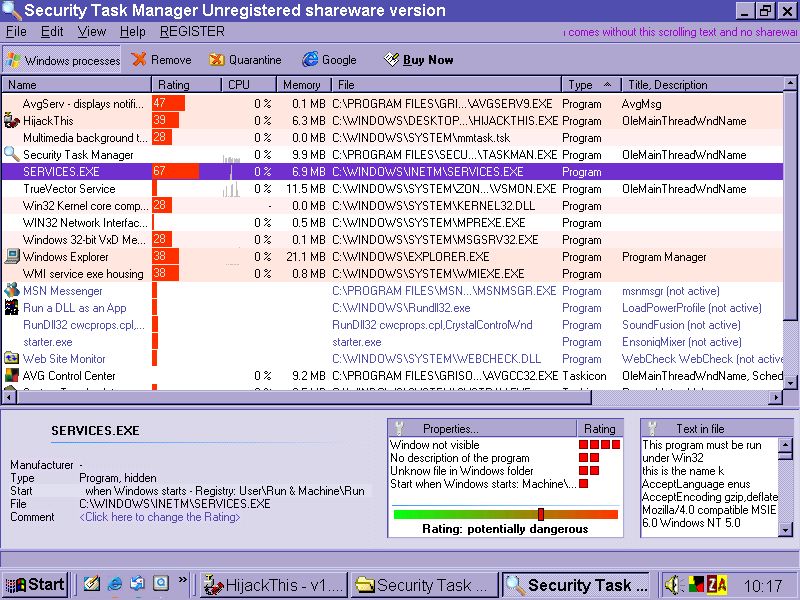
Just out of interest.... i dl'd 'Security Task manager'.... it looks v coool.... hehe.... but when i was fiddling last night i couldn't get Services to work for me....blummin typical lol
but here's a SS of it in full flow.... it's now rated as 'potentially dangerous' oooooo hehe
lilpink x
but here's a SS of it in full flow.... it's now rated as 'potentially dangerous' oooooo hehe
lilpink x
System specs:
Clovebud No.7, Max Factor Hypersmooth, L'Oreal Lash Architect, The Body Shop Poudre Libre, 17 Nude blusher and hair by Uppercutz.
Clovebud No.7, Max Factor Hypersmooth, L'Oreal Lash Architect, The Body Shop Poudre Libre, 17 Nude blusher and hair by Uppercutz.
-
lilpinkflower - Moderator
- Posts: 1603
- Joined: Wed Apr 07, 2004 1:00 am
- Location: manchester, U.K
Thanks given:0
Thanks received:0
by brad » Sun Aug 22, 2004 10:34 am
Do this exactly:
From Kephyr:
Start your computer in safe mode.
Start the registry editor. This is done by clicking Start then Run. (The Run dialog will appear.) Type regedit and click OK. (The registry editor will open.)
Browse to the key:
'HKEY_LOCAL_MACHINE \ SOFTWARE \ Microsoft \ Windows \ CurrentVersion \ Run'
In the right pane, delete the value called 'xpsystem', if it exists.
Browse to the key:
'HKEY_CURRENT_USER \ SOFTWARE \ Microsoft \ Windows \ CurrentVersion \ Run'
In the right pane, delete the value called 'xpsystem', if it exists.
Delete 'HKEY_LOCAL_MACHINE \ SOFTWARE \ Classes \ CLSID \ {5321E378-FFAD-4999-8C62-03CA8155F0B3}', if it exists.
Delete 'HKEY_LOCAL_MACHINE \ SOFTWARE \ Microsoft \ Windows \ CurrentVersion \ Explorer \ Browser Helper Objects \ {5321E378-FFAD-4999-8C62-03CA8155F0B3}', if it exists.
Exit the registry editor.
Start Windows Explorer and delete:
%SystemDir%\SERVICES\SERVICES.EXE
%SystemDir%\SERVICES\Y.EXE
%SystemDir%\SERVICES\1.00.07.dll
Note: %SystemDir% is a variable (?). By default, this is C:\Windows\System (Windows 95/98/Me), C:\WINNT\System32 (Windows NT/2000), or C:\Windows\System32 (Windows XP).
Start Microsoft Internet Explorer.
In Internet Explorer, click Tools -> Internet Options.
Click the Programs tab -> Reset Web Settings.
brad
From Kephyr:
Start your computer in safe mode.
Start the registry editor. This is done by clicking Start then Run. (The Run dialog will appear.) Type regedit and click OK. (The registry editor will open.)
Browse to the key:
'HKEY_LOCAL_MACHINE \ SOFTWARE \ Microsoft \ Windows \ CurrentVersion \ Run'
In the right pane, delete the value called 'xpsystem', if it exists.
Browse to the key:
'HKEY_CURRENT_USER \ SOFTWARE \ Microsoft \ Windows \ CurrentVersion \ Run'
In the right pane, delete the value called 'xpsystem', if it exists.
Delete 'HKEY_LOCAL_MACHINE \ SOFTWARE \ Classes \ CLSID \ {5321E378-FFAD-4999-8C62-03CA8155F0B3}', if it exists.
Delete 'HKEY_LOCAL_MACHINE \ SOFTWARE \ Microsoft \ Windows \ CurrentVersion \ Explorer \ Browser Helper Objects \ {5321E378-FFAD-4999-8C62-03CA8155F0B3}', if it exists.
Exit the registry editor.
Start Windows Explorer and delete:
%SystemDir%\SERVICES\SERVICES.EXE
%SystemDir%\SERVICES\Y.EXE
%SystemDir%\SERVICES\1.00.07.dll
Note: %SystemDir% is a variable (?). By default, this is C:\Windows\System (Windows 95/98/Me), C:\WINNT\System32 (Windows NT/2000), or C:\Windows\System32 (Windows XP).
Start Microsoft Internet Explorer.
In Internet Explorer, click Tools -> Internet Options.
Click the Programs tab -> Reset Web Settings.
brad
- brad
- Geek Alumni
- Posts: 2079
- Joined: Sat Jul 19, 2003 1:00 am
- Location: Charlotte, NC
Thanks given:0
Thanks received:0
by lilpinkflower » Tue Aug 24, 2004 9:38 am
I have done the kephyr fix previously... but i did it again.. and the comp was clean !! And it stayed clean for nearly an hour... even though i clicked around and tried to get it all to start up again.... i was sooooo pleased !
THEN I tried to save a clean HJT log to post and as soon as i accessed the disk drive it all came back again !!!! So I tried to think why and i realised there was a dirty win.ini on the floppy... sooooo i did the Kephyr fix again and this time tried to save the log with a totally clean floppy..... the same thing happened again !!! Using the disk drive was jolting it back into action
I would love to know what's starting this thing.... I had a day off from its yesters... but i've got no fresh ideas wotsoever today... i think it needs wiping completely... the comp... but ive got no win98CD ....eeeeeeeek...
If anyone has got anything else i can try it will be greatly appreciated !!
lilpink x
THEN I tried to save a clean HJT log to post and as soon as i accessed the disk drive it all came back again !!!! So I tried to think why and i realised there was a dirty win.ini on the floppy... sooooo i did the Kephyr fix again and this time tried to save the log with a totally clean floppy..... the same thing happened again !!! Using the disk drive was jolting it back into action
I would love to know what's starting this thing.... I had a day off from its yesters... but i've got no fresh ideas wotsoever today... i think it needs wiping completely... the comp... but ive got no win98CD ....eeeeeeeek...
If anyone has got anything else i can try it will be greatly appreciated !!
lilpink x
System specs:
Clovebud No.7, Max Factor Hypersmooth, L'Oreal Lash Architect, The Body Shop Poudre Libre, 17 Nude blusher and hair by Uppercutz.
Clovebud No.7, Max Factor Hypersmooth, L'Oreal Lash Architect, The Body Shop Poudre Libre, 17 Nude blusher and hair by Uppercutz.
-
lilpinkflower - Moderator
- Posts: 1603
- Joined: Wed Apr 07, 2004 1:00 am
- Location: manchester, U.K
Thanks given:0
Thanks received:0
by lilpinkflower » Tue Aug 24, 2004 4:34 pm
System specs:
Clovebud No.7, Max Factor Hypersmooth, L'Oreal Lash Architect, The Body Shop Poudre Libre, 17 Nude blusher and hair by Uppercutz.
Clovebud No.7, Max Factor Hypersmooth, L'Oreal Lash Architect, The Body Shop Poudre Libre, 17 Nude blusher and hair by Uppercutz.
-
lilpinkflower - Moderator
- Posts: 1603
- Joined: Wed Apr 07, 2004 1:00 am
- Location: manchester, U.K
Thanks given:0
Thanks received:0
How I did it...
by Frontman » Thu Aug 26, 2004 4:29 am
Howdy all,
I caught this same bug today. Spent from 11:45am to 10pm going through the motions of cleaning my machine. AND thanks to this site and this thread, it looks okay now.
First though, Norton Anti-Virus with current updated definitions did not stop this bug. I did receive a warning by NAV but by then the damage was done.
My hompage was hijacked and even locking the homepage changes in Spybot S&D would not keep it from rolling back to their search page as my homepage.
During the bug, I had problems viewing webpages at symantec and windowsupdate.microsoft.com. Further, I had problems searching for web pages that said anything about "inetm". In fact, this PC Tech thread failed to load until I went back and forward a few times. I wonder if this is because it put it's own search engine header on webpages I was viewing. Remarkably though, it was selective and did not do _every_ webpage I visited.
The way I did it... I drive an XP SP1 with IE6. The following is probably the model of overkill but here goes...
#1. Notepad is still in the windows folder. This bug is copies the original Notepad.exe to Notepad.exe.bak. I just renamed it back.
#2. I was unable to delete c:\windows\inetm\ folder until I ran Security Task Manager. THANKS FOR THAT IDEA. I quarantined the xpsystem "services" file.
#3. I dumped my internet cache.
#4. I used Norton Cleansweep to remove all extraneous files.
#5. I deleted EVERY comment in my registry that had "inetm" as a value. Just do a search with regedit and DON'T delete inetmeeting stuff.
#6. THEN rebooted in safemode.
#7. I deleted c:\windows\inetm folder.
#8. Reboot Normal and much happier surfer.
THE END
P.S. I did not see the files (...\services\Y.exe or ...\services\1.00.07.dll)that kephyr.com listed as causes. Although, ...\services\1.00.04.dll was in my inetm folder.
THANKS to this thread for a great running commentary on this pest. I guess I'm lucky to be able to personally recognize weird entries in my running processes and msconfig lines. So, that's how I found PC Techforums.
Great work Cactus, Brad, and PCguy for outstanding help for lilpinkflower AND me!
Hey, if it was an XP or IE exploit using ActiveX and NAV saw it then why did it not stop it? Is there a place to post bugs?
Vaya con Dios,
Chris H.
Atlanta
http://www.gapaintball2.com
p.s. Jesus is coming, look busy.
I caught this same bug today. Spent from 11:45am to 10pm going through the motions of cleaning my machine. AND thanks to this site and this thread, it looks okay now.
First though, Norton Anti-Virus with current updated definitions did not stop this bug. I did receive a warning by NAV but by then the damage was done.
My hompage was hijacked and even locking the homepage changes in Spybot S&D would not keep it from rolling back to their search page as my homepage.
During the bug, I had problems viewing webpages at symantec and windowsupdate.microsoft.com. Further, I had problems searching for web pages that said anything about "inetm". In fact, this PC Tech thread failed to load until I went back and forward a few times. I wonder if this is because it put it's own search engine header on webpages I was viewing. Remarkably though, it was selective and did not do _every_ webpage I visited.
The way I did it... I drive an XP SP1 with IE6. The following is probably the model of overkill but here goes...
#1. Notepad is still in the windows folder. This bug is copies the original Notepad.exe to Notepad.exe.bak. I just renamed it back.
#2. I was unable to delete c:\windows\inetm\ folder until I ran Security Task Manager. THANKS FOR THAT IDEA. I quarantined the xpsystem "services" file.
#3. I dumped my internet cache.
#4. I used Norton Cleansweep to remove all extraneous files.
#5. I deleted EVERY comment in my registry that had "inetm" as a value. Just do a search with regedit and DON'T delete inetmeeting stuff.
#6. THEN rebooted in safemode.
#7. I deleted c:\windows\inetm folder.
#8. Reboot Normal and much happier surfer.
THE END
P.S. I did not see the files (...\services\Y.exe or ...\services\1.00.07.dll)that kephyr.com listed as causes. Although, ...\services\1.00.04.dll was in my inetm folder.
THANKS to this thread for a great running commentary on this pest. I guess I'm lucky to be able to personally recognize weird entries in my running processes and msconfig lines. So, that's how I found PC Techforums.
Great work Cactus, Brad, and PCguy for outstanding help for lilpinkflower AND me!
Hey, if it was an XP or IE exploit using ActiveX and NAV saw it then why did it not stop it? Is there a place to post bugs?
Vaya con Dios,
Chris H.
Atlanta
http://www.gapaintball2.com
p.s. Jesus is coming, look busy.
-

Frontman 
- Newbie
- Posts: 1
- Joined: Thu Aug 26, 2004 1:00 am
Thanks given:0
Thanks received:0
47 posts
• Page 3 of 4 • 1, 2, 3, 4
Who is online
Users browsing this forum: No registered users and 10 guests